
Your GPU is busy. The other computer is waiting.
You ask a coding agent to review a repository. It needs to examine several files before writing a summary. Your GPU is occupied, while another computer on the network could take some of the work. How do you send requests to it without redesigning the application?
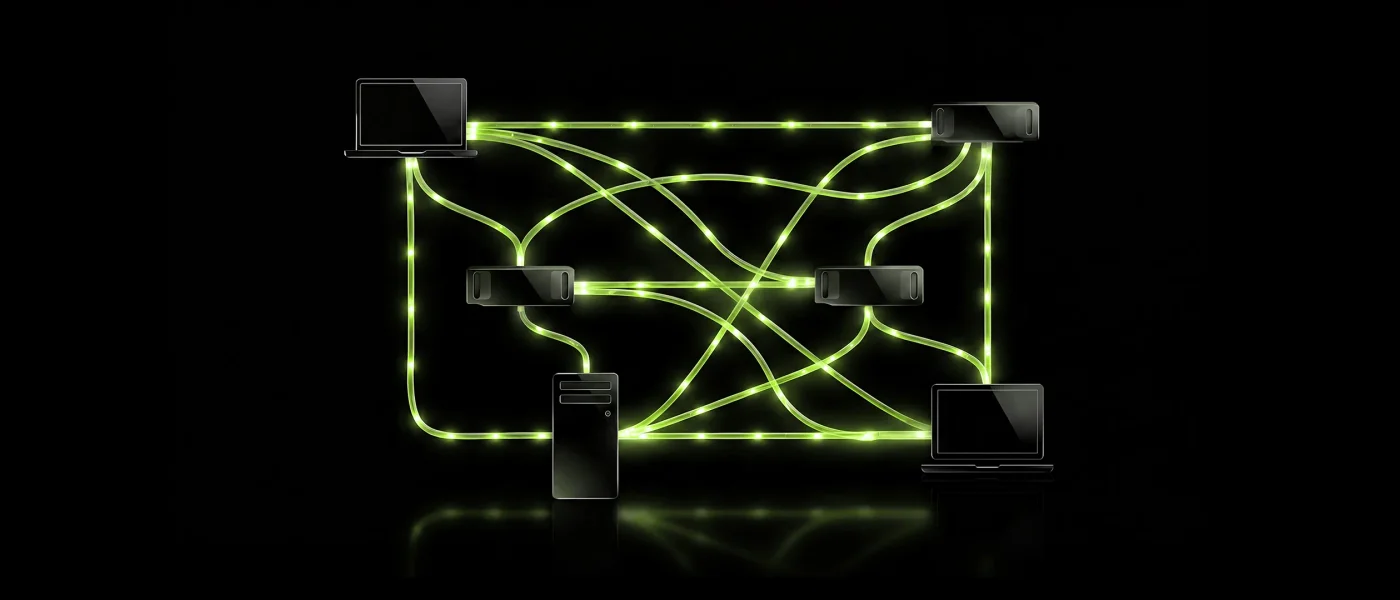
That is the role of NVIDIA Personal AI Router, or PAIR, introduced on September 3, 2026. It sits between your application and the Ollama or LM Studio inference engines, discovers available computers and chooses where each request should run.
The idea is straightforward. The outcome depends on the choice. If your agent needs every file analysis before it can write the summary, a request assigned to a slow computer can hold up the whole task. Understanding when PAIR helps starts with understanding how it shares that work.
This article examines version 0.1.1, its code and documentation reviewed on September 8, 2026. The benchmarks come from NVIDIA and another author. LeCompute has not performed hardware measurements for this analysis.
What happens to a request
Ollama and LM Studio are inference engines: they load a model into memory and use it to produce a response, one piece of text at a time. Those pieces are tokens. PAIR chooses which computer gets the job and sends the resulting response back to your application.
Suppose two computers each have a copy of the same model. PAIR can send one request to the first computer and a separate request to the second. Each computer performs all the computation for its request using its own resources. The NVIDIA project describes this as request-level routing.
The two computers keep their memory separate. If neither can run the model on its own, PAIR cannot join them together to make it fit. An inference engine may be able to split a model across several GPUs inside one computer, but that is the engine’s responsibility.
This arrangement also explains what the network does. It carries the request and the generated text. PAIR does not arrange GPU-to-GPU exchanges at every stage of the model’s computation. Large inputs or a poor connection can slow the trip, but a specialized accelerator interconnect is not a prerequisite for every PAIR setup.
If your goal is to fit a larger model, memory capacity is the issue. If you want to process several requests together, keeping multiple copies becomes useful. Our comparison of one RTX PRO 6000 and three RTX 5090s explores that distinction.
The requested model needs to be in the right place
You ask Ollama for a particular model. PAIR looks for computers that list that model in their Ollama inventory, then chooses among them. A computer that only has a different model cannot receive this request.
Copying the model to a second computer allows that computer to participate. Installing a smaller specialist model there may help with other tasks, provided your application asks for it explicitly. PAIR does not read the question and decide that a smaller model would be sufficient.
If no suitable computer is available, the proxy, the local gateway through which the request passes, returns a 502 error. It does not substitute another model. These selection rules are described in the architecture documentation.
When comparing machines, check what sits behind the model name: the weight revision, quantization, context length and generation settings. Otherwise, a difference caused by model files or configuration can look like a hardware advantage.
Each computer also needs enough memory. Alongside the model weights, the engine needs working buffers and the KV cache The stored key and value vectors an LLM has already computed for every token it has processed. It avoids recomputing attention over the whole history, at the cost of a memory footprint that grows with the context length. , which stores intermediate results from the context so they do not have to be recalculated during generation. Our guide to how much VRAM a local LLM needs explains how to budget for these allocations.
How PAIR chooses between computers
When several computers offer the model, PAIR needs to choose one for the next request. Its scheduler, the component that makes this choice, counts jobs waiting or running on each computer. It also considers GPU utilization.
In the version examined here, GPU activity is reduced to a score from 0 to 3. PAIR adds that score to the job count and favors computers with a lower total. Ties are broken by the GPU score, then the machine identifier. Ollama and LM Studio jobs contribute to the same machine ranking, as shown in the scheduler code.
The score rises when smoothed GPU utilization crosses 40%, 70% and 85%. It falls at lower thresholds to avoid switching at every small fluctuation. A missing measurement, or one older than ten seconds, receives a score of 1. PAIR therefore handles missing information without assuming the GPU is idle. The telemetry code defines these rules.
This gives PAIR a view of machine activity. To predict when a response will arrive, it would also need to know how quickly each computer can complete the requested work.
Two GPUs can show the same utilization while producing very different amounts of text per second. A short extraction and a long writing task also count as one job each, despite taking very different amounts of time.
NVIDIA’s known issues state that the choice does not account for GPU model, available memory, measured latency, estimated request cost or whether the model is already loaded. These limitations explain why an extra computer needs to be tested against your own workload.
Can two computers finish later than one?
Imagine twelve identical requests, ready to start together. Computer A takes two seconds per request. Computer B takes six. In this hypothetical example, each runs one request at a time, the models are already loaded, durations stay constant and network time is ignored.
With A alone, the work takes 24 seconds: twelve requests at two seconds each.
If a router gives six requests to each computer, A finishes its share in twelve seconds. B takes thirty-six seconds to finish its share. You therefore wait 36 seconds for the complete batch, twelve seconds longer than with A alone.
B could still be useful. Give nine requests to A and three to B, and both finish in eighteen seconds. The same hardware now completes the batch 25% sooner than A alone. The benefit comes from matching the work allocation to the two different processing speeds.
What the first benchmarks actually show
In its launch demonstration, NVIDIA uses Hermes Desktop with five subagents, Ollama and Qwen 3.6 35B A3B. The task takes an average of 18 minutes on an RTX Spark laptop, then 8 minutes 48 seconds with that laptop, a DGX Spark and an RTX 5090.
That is roughly a 2.05× speedup in this configuration. The result measures the complete agent task. It does not mean each individual generation becomes 2.05 times faster.
NVIDIA calls the test an unofficial demonstration. It does not report the fastest of the three computers running the same task alone, or a detailed spread of results. The numbers show a gain over the laptop; they leave the comparison with the other computers used individually unresolved.
A test published by Mark Bartlett on September 4 uses a different baseline. He compares an RTX 3090 alone with that same GPU joined by an RTX 3060 through PAIR. Across twenty requests, using the same quantized model and one execution slot per engine, he reports 47.09 seconds versus 44.10 seconds. That is approximately 6.3% less time, or a 1.07× speedup.
This is one specific configuration, and the author also develops a competing router. His explanation needs a separate qualification: he describes a scheduler based only on job counts, whereas the code examined here also considers GPU activity. The reported times remain an observation to reproduce. That description does not establish their cause.
Chat, shared server or agent: the workload changes the benefit
In a conversation, you send a question, wait for the answer and then ask the next one. Each generation runs on one computer. PAIR can choose another computer when the first is busy, but it does not make all your GPUs work together on that answer.
With several users, more requests can run independently. Extra computers can take requests that would otherwise wait. The comparison should still use a properly configured single engine. Ollama already supports parallel requests when memory permits, with settings including OLLAMA_NUM_PARALLEL.
The coding agent reviewing your repository combines both patterns. It can examine several files at once, then wait for those analyses before writing the summary. PAIR distributes the requests the application sends. The application has to produce independent work; the router does not turn a sequence of dependent steps into parallel execution.
For that workload, time the task through to its final result and check its quality. An agent that makes more model calls can keep more GPUs busy while taking longer to produce a correct summary. Our article on measuring coding agents examines the same problem.
For an agent that changes code, also track test preparation: retrieving source can leave the rest of the pipeline waiting. Our analysis of Scion, Anthropic’s source control system, examines source distribution and opportunities to share that work.
An available model may not be ready to answer
Your second computer advertises the right model and its GPU is idle. PAIR sends it a request. The response still takes a while: the model is on disk, but the engine has to load it into memory.
PAIR’s engine lifecycle does not preload models when an engine starts. LM Studio also offers just-in-time loading and automatic unloading, described in its server settings. Depending on those settings, two requests separated by an idle interval may each trigger a load.
Before producing the first token, the computer may need to read the weights, prepare working buffers and process the input. Keeping the model loaded avoids repeating part of that work, but reserves memory. The useful setting depends on how frequently requests arrive and what else uses the computer.
The delay can also cause an error. In the Ollama proxy in PAIR 0.1.1, the wait for HTTP response headers is limited to 120 seconds. These headers mark the beginning of the server’s response. Queueing or loading that delays them long enough can cause the attempt to fail.
This limit applies to the start of the response. It does not automatically stop a generation that has already been streaming text for two minutes. That distinction helps avoid blaming response length when the delay happens before output begins.
Before you connect your computers
Start by running the model directly in Ollama or LM Studio on each computer. That checks the engine, driver and available memory before you add PAIR.
The NVIDIA playbook names GeForce RTX 20 Series and newer GPUs, RTX PRO from Turing onward and DGX Spark. The launch post also mentions Apple M4 or newer Macs. The repository lists Windows on Arm as experimental.
Opening PAIR on a system and running your model on it are separate checks. For an older Mac or an AMD GPU, support in Ollama or LM Studio alone does not establish NVIDIA validation of the complete setup. The DGX Spark versus RTX 5090 and RTX Spark versus DGX Spark comparisons explain the hardware differences; the direct test checks your software configuration.
Once the machines are ready, copy the address shown in Endpoints into your application. In the standard installation, PAIR takes the engine’s usual port and moves the engine to another one. Existing installations or port conflicts can change this arrangement. The getting-started guide distinguishes the two addresses: the proxy routes requests through PAIR, while the engine address bypasses it.
Keep the engine consistent along that path. A request sent to the Ollama proxy must reach Ollama. Even though Ollama and LM Studio offer OpenAI-compatible APIs, such as /v1/chat/completions, PAIR does not convert a request to switch between them.
Which computers can read your data?
The selected computer receives your request so it can process it. If that request contains private code or a sensitive document, you need to trust that computer.
PAIR encrypts inference exchanges between paired machines using mutual TLS: each endpoint verifies the other’s identity. The local application uses an HTTP interface bound to the computer itself. The security document explains the boundaries of this protection.
Some information remains accessible over unauthenticated HTTP on the subnet, including machine names, inventory and hardware utilization. Encrypting inference traffic therefore does not protect every piece of operational information. This matters when choosing the network and which computers may join it.
Running a model locally also does not rule out internet connections. Engines can download models or use cloud features, and agents can call remote tools. Ollama documents an option to disable its cloud features. To keep an entire task local, check those settings and the tools your application uses as well.
How to test whether PAIR saves you time
Choose a workload that represents what you actually do and run it on each computer separately. Keep the same weights, quantization, context length and generation parameters. Record the engine versions and parallel request settings. Your baseline is the computer that completes this particular workload fastest.
Then compare three arrangements: that engine accessed directly, PAIR connected only to that computer, and PAIR with the additional computers. The middle step helps reveal the proxy’s cost before you measure what the extra machines contribute.
Repeat the tests and alternate their order. A computer warming up, a model loaded during the first run or an application working in the background can change the timing. Separate cold-start tests from tests with models already in memory.
You could start with one, four and eight simultaneous requests, keeping their contents fixed. Measure time to first token, generation time, total latency and errors. Check how many tokens were actually produced: setting the same output limit does not guarantee responses of the same length.
Across enough runs, the median describes the middle of the observed timings. The 95th percentile, the delay below which 95% of observations fall, helps track slower responses. Report the sample size alongside these values, because a handful of runs gives an unstable percentile. Our article on inference latency explains what each timing tells you.
For a batch, time the last result and count successful tasks. For an agent, also check the final summary and completed steps. The Jobs view shows which machines received requests. Appearing in the inventory does not establish that a computer participated in the work.
If you also want to save energy, measure power at the wall across all participating computers for the same workload. Finishing sooner with more computers powered on does not guarantee lower total energy use.
Should you connect your machines?
PAIR is worth trying if you have several requests that can run independently and computers capable of executing the required models. Start with two machines, check that both receive work and compare total completion time against your fastest computer alone.
If the delay comes from one long generation, or a model that needs more memory, PAIR does not provide the mechanism to spread that computation across computers. Model choice, engine settings or an engine designed for distributed computation will be more relevant.
The development to watch is how PAIR selects destinations. Accounting for each computer’s speed and whether the model is already loaded could help it predict which machine will finish a request first. That would make it better equipped to use computers with very different capabilities together.
Sources and method
Verified facts from primary sources. The announcement date and Hermes demonstration come from NVIDIA’s September 3, 2026 technical post. The 0.1.1 release identifies the commit examined here; that release predates the blog announcement. NVIDIA’s timings are published results, not LeCompute measurements.
The behavior was checked against the README, architecture, known issues, engine lifecycle and getting-started guide. Hardware support follows the NVIDIA playbook and launch post reviewed on September 8, 2026.
Code inspection covers schedule.go, telemetry.go and the Ollama proxy at commit 13b68115fa2c9c1d94f1ead1358f8d5a527cfecf. The 120-second limit concerns response headers in that transport, without generalizing to every timeout in the stack. Trust boundaries were checked against SECURITY.md.
Parallel execution, model residency and cloud settings come from the Ollama FAQ and LM Studio server settings. Documentation changes over time; these limits need checking again for later releases.
Third-party measurements and derived calculations. The 47.09 and 44.10-second results are reported by Mark Bartlett on InsiderLLM under his stated test conditions. The time reduction is (47.09 − 44.10) / 47.09, approximately 6.3%. The speedup is 47.09 / 44.10, approximately 1.07. These are not LeCompute measurements, and citing the timings does not endorse every causal explanation in the report.
Hypotheses and proposed method. The twelve-request batch, two- and six-second processing times and associated allocations are a constructed example. The 24, 36 and 18-second totals follow from those assumptions, with no network overhead, duration variation or parallel execution inside either engine. The comparison protocol is a proposed experiment, not a test we performed. This analysis makes no universal claim of throughput, energy or cost savings.