
A mobile application has to work around the model
A field technician receives a customer message on a phone: “I would like an appointment on 12 November 2026 in London.” The application could extract the date and city on the device, prefill a form and ask for confirmation. That remains useful without connectivity when the model and required data are already available locally.
The product still has to keep its interface responsive, retain the technician’s documents and coexist with other processes. A model that consumes too much memory or monopolizes resources can make a small convenience unpleasant to use. A compact model earns its place when it completes the same useful task correctly within the application’s resource budget.
This is the relevant lens for LFM3-1.7B, Liquid AI’s text model. The company introduced the LFM3 family on October 27, 2026 for specialized applications, including on-device use. Text, vision and audio variants are separate checkpoints. This article compares the text checkpoint with identified Qwen models and follows the path into a mobile or embedded application.
Documentation was checked on November 1, 2026. Measurements are published by Liquid AI; LeCompute has neither independently benchmarked the hardware nor deployed LFM3 in a mobile application. Application scenarios are candidates for evaluation.
Useful work on a phone or field terminal
In the appointment example, the model takes text and proposes date and city fields. The application validates them before displaying the suggestion. Calendar permissions and the decision to save an appointment remain in application code. LFM3 can be evaluated as the message-interpretation component, while the product controls the action.
Another candidate is helping a technician find a procedure in manuals stored on a terminal. The application retrieves relevant passages, supplies them to the model and shows an answer with its source. A text model does not automatically index the whole library. Retrieval and checking the explanation remain part of the product.
A maintenance report could also become fields for review: equipment, symptoms and work performed. Dictating that report requires a speech-to-text component first. Reading a photograph similarly needs vision or OCR. The LFM3-1.7B checkpoint examined here takes text; the family’s multimodal variants are not automatically included.
These workflows can also be evaluated with Qwen. LFM3’s value depends on task quality and resource use on the target device. A deterministic rule remains preferable when it already handles a fixed input format correctly.
Processing text on the device can avoid sending it to a remote model. The same benefit applies to a locally running Qwen. Still examine application tools: web search or a remote calendar remains a network interaction.
Which Qwen are we comparing against?
Qwen is a family. Comparing LFM3-1.7B with a much larger Qwen answers a different question from comparing it with Qwen3.5-2B, a closer model-size class. Liquid AI’s mobile benchmark includes Qwen3.5-4B, but not that 2B checkpoint. Keep this distinction visible before reading the throughput bars.
Here, B indicates a size class in billions of parameters, the values learned by the model. Parameter count alone does not determine runtime memory or task quality.
| Model | Documented inputs | Role in this comparison |
|---|---|---|
| LFM3-1.7B | Text | Compact model measured on iPhone by Liquid AI |
| Qwen3.5-2B | Text and images | Closer size class; absent from the cited mobile benchmark |
| Qwen3.5-4B | Text and images | Published comparison available, with a larger model |
The Qwen3.5-2B and Qwen3.5-4B cards describe vision-language models. If your application needs to read photographs directly, that capability changes the decision and the complete resource budget. A text-generation measurement cannot stand in for a comparison of every supported feature.
A useful comparison therefore specifies the job: extract appointment fields at the same required success level, on the same phone, then measure time and memory. Higher generation throughput can be outweighed by more incorrect fields to repair.
What the iPhone 17 Pro benchmark establishes
Liquid AI’s edge-inference evaluation uses Q4_0 GGUF weight files with 32,768 context tokens, one sequence and 100 output tokens, with GPU offload. On iPhone 17 Pro, execution uses an iOS application built on llama.cpp. LFM3 uses a build supporting its architecture; comparison models use b11744.
| Published metric | LFM3-1.7B | Qwen3.5-4B |
|---|---|---|
| Input processing, prefill | 1,061 tokens/s | 339 tokens/s |
| Generation, decode | 43.6 tokens/s | 15.5 tokens/s |
| Process memory footprint | 1.90 GB | 4.53 GB |
Prefill processes the supplied input; decode generates subsequent output. The published figures favor LFM3’s throughput and memory footprint under this protocol. A lower footprint can make coexistence with the application easier. It does not measure the phone’s total remaining free RAM.
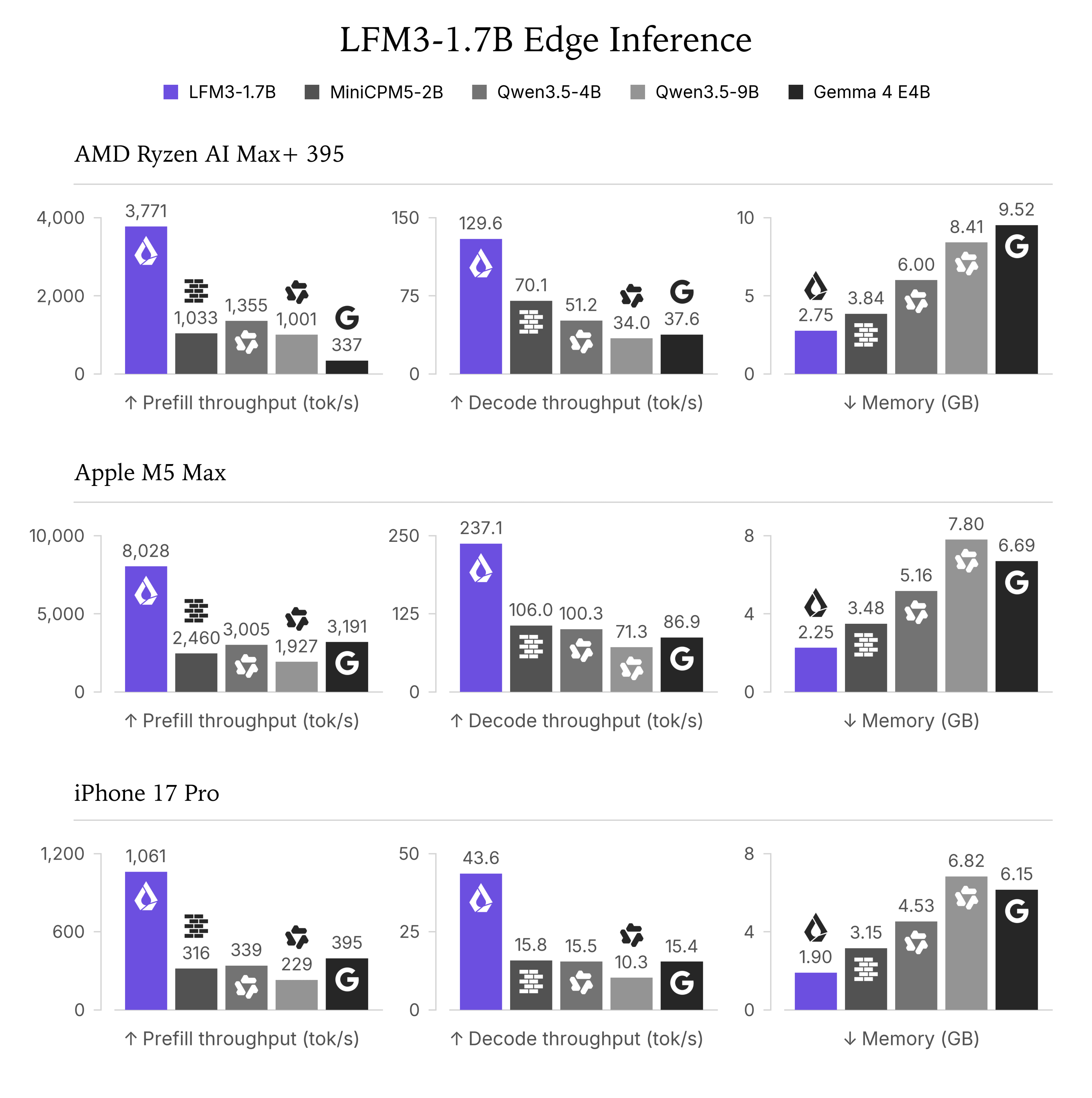
The complete chart also includes computers. Each row identifies a device and each column a metric. Apple memory is process footprint including Metal; AMD results sum host and GPU peaks that need not occur simultaneously. Those values should not be combined as if measured on one phone.
The benchmark does not establish longer battery life or lower heat. It gives neither energy per completed task nor sustained throughput across repeated use. A 32K-context run also does not automatically represent a short appointment message. Those questions require application-specific measurements.
Faster generation does not settle answer quality
Liquid AI also publishes quality evaluations. On RULER 128K, a benchmark of information processing over long contexts, its card reports 65.56 for LFM3-1.7B and 84.63 for Qwen3.5-4B. This evaluation uses vLLM in BF16, a 16-bit format, with a maximum configured context of 262,144 tokens for these two models. The stated general sampling settings are temperature 0.6 and top_p 0.95. It is separate from Q4_0 inference on iPhone.
That is sufficient to rule out a universal winner: the model with the smaller footprint in the mobile chart does not lead every quality task. It also does not predict your quantized appointment extractor’s accuracy. Evaluate correct fields, invented information and appropriate clarification directly on your examples.
The card advises against agentic coding and complex multi-step reasoning for this small model. LFM3 needs to earn its place on the work your application actually delegates, and Qwen3.5-2B still needs testing under the cited mobile protocol. No numbers for that checkpoint are extrapolated here.
Hybrid architecture matters, but Qwen is hybrid too
LFM3’s configuration describes 24 layers: 13 short convolutions, 5 sliding-window attention layers and 6 global attention layers. Short convolutions retain local state; sliding attention examines a recent region; global attention supports interactions with more distant positions.
These operators distribute costs differently. Retaining bounded local state does not require the same storage as caching keys and values for the whole preceding context. Global layers still add a component that grows with sequence length. Training and the runtime’s implementation of each operator also affect the outcome.
The configurations for Qwen3.5-2B and Qwen3.5-4B also combine linear and full attention. Describing them as plain full-attention Transformers opposed to a “hybrid” LFM would misrepresent the comparison. Operators, dimensions and software differ; an architecture label cannot replace measurements.
Phone memory includes more than the weight download
The GGUF repository provides files around 1.05 GB in Q4_0 and 1.10 GB in Q4_K_M. Context, convolution state, workspaces and application memory add to that download. The KV cache The stored key and value vectors an LLM has already computed for every token it has processed. It avoids recomputing attention over the whole history, at the cost of a memory footprint that grows with the context length. retains attention keys and values needed to continue generation.
A worked estimate makes context cost tangible. With 6 global layers, 4 KV heads of dimension 128, one sequence and a BF16 cache using two bytes per value, that component alone is:
global cache = layers × 2 (keys and values) × KV heads
               × head dimension × tokens × bytes

6 × 2 × 4 × 128 × 4,096 × 2 = 50,331,648 bytes
That is approximately 50.3 MB at 4,096 tokens, versus 402.7 MB at 32,768 tokens, under the same assumptions. These are global-cache calculations, not llama.cpp measurements or total model memory. Local attention and runtime allocations remain additional requirements, and an implementation may use another cache format.
The appointment application can retain the current message, timezone and expected fields. Months of unrelated history add work without necessarily helping fill the form. The advertised 256K context is a model capability, rather than a default phone configuration.
Our LLM memory budgeting guide explains the additional components needed to size a service.
How inference actually enters an iOS or Android app
On a computer, you can start a server and send HTTP requests. On phones, Liquid AI’s mobile integration guide instead describes linking the llama.cpp library into the application and calling its native API. GGUF weights reside on the device, allowing computation inside the application process.
For iOS, the guide describes adding an XCFramework in Xcode. For Android, it uses the NDK, which compiles native C/C++ components, and llama.cpp’s Android example. The page’s sample code includes LFM2.5 models: it documents integration mechanics rather than a validated LFM3 recipe. LFM3 requires a compatible runtime, at least b11960 / v0.8.0 according to its GGUF card, and the correct checkpoint’s chat template.
The application must manage loading, cancellation and memory release. It should also keep inference off the thread responsible for the interface so the screen remains responsive. Generated text needs parsing and validation before becoming an action.
Local execution does not imply NPU or Neural Engine acceleration. The backend needs implementations of the model’s operators for the chosen accelerator. A llama.cpp measurement with GPU offload does not establish that support across every phone.
For embedded systems, the same reasoning applies to a maintenance terminal or Linux board capable of hosting the runtime and allocations. A small microcontroller does not become compatible with gigabyte-scale weights because a model is marketed as edge AI. Target memory, operator support and compute budget determine feasibility.
Compare on the device you plan to ship
Prepare identical requests in the application’s languages and formats. Establish acceptable output quality first, then compare time to that accepted result. Retries and corrections can erase a generation-speed advantage. Tokenization can also differ between models: wall-clock time for a common task provides information that tokens per second alone cannot.
Use a runtime version supporting both candidates and document backends and quantization. Preserve each model’s own chat template. Liquid AI’s migration guide highlights template and tool-parser differences; changing only a filename can produce an invalid evaluation.
Measure cold loading, time to first output, completion time and the whole application’s peak memory. Then repeat the workload over time, recording energy use, thermal state and changes in latency under comparable conditions. A strong first request does not characterize a phone used repeatedly.
The published 32K benchmark is a starting point. Include the short context your feature needs and test Qwen3.5-2B when its size and capabilities match the requirement. The decision concerns a correct task within your product limits, rather than a brand winning on every device.
Prototype on a computer before porting to a phone
The following walkthrough checks prompting, downloading and output format on a computer. It does not measure a mobile application. Start with graphical chat or go directly to the local server for a programmatic integration. For phone deployment, then use the native library described above and measure on the target.
Try LFM3 in LM Studio without writing code
A graphical application is the most accessible route to a first conversation. The official GGUF card lists LM Studio on Windows, macOS and Linux, requiring llama.cpp engine 2.65.1 or newer. That is the engine version, not the LM Studio application version. Check the software’s system requirements against your computer as well.
In the Download LM Studio section of the official download page, choose your operating system and install the chat application. In Discover, search for LiquidAI/LFM3-1.7B-GGUF and choose Q4_K_M from the LiquidAI repository. This file contains quantized weights for the local runtime. The download is approximately 1.10 GB; execution needs additional memory, as explained above.
Switch to Chat and select the downloaded model in the model loader. Start with 4,096 context tokens and temperature 0.1. The first setting bounds retained text for this exercise; the second reduces sampling randomness without guaranteeing identical results. LM Studio’s getting-started guide distinguishes downloading a model from loading it into memory: complete both before sending a message.
Paste this prompt into the conversation:
Extract the date and city from the following message.
Return only a JSON object with the keys date and city.
Use YYYY-MM-DD for the date. Add no other text.
Message: I would like an appointment on 12 November 2026 in London.
The target is shown below. It is the expected answer for the exercise, rather than output measured by LeCompute:
{
  "date": "2026-11-12",
  "city": "London"
}
Check the values, then try an ambiguous sentence or another city. This is a conversation with a local model. It has not consulted your calendar or booked anything. Once the runtime and weights are downloaded, this chat can work offline without external tools; LM Studio’s offline documentation explains which operations still need a connection.
Run an LFM3 server on a Windows PC
A server becomes useful when you want to integrate the model into a program. Your application sends a message over HTTP and receives output instead of relying on copied text from a chat window. You can start with this route directly; LM Studio does not need to be installed alongside it.
For a Windows x64 PC with an Intel or AMD processor, open the llama.cpp b11960 release and download Windows x64 (CPU), named llama-b11960-bin-win-cpu-x64.zip. This release corresponds to v0.8.0, Liquid AI’s stated minimum for LFM3. Extract the archive into a folder and keep its files together, including DLLs. Windows on ARM needs the corresponding ARM archive rather than this x64 walkthrough’s package.
Open PowerShell in the folder containing llama-server.exe. This command should display the executable’s version:
.\llama-server.exe --versionStart the server next. This example deliberately runs on the CPU so that the first request does not require CUDA setup:
.\llama-server.exe -hf LiquidAI/LFM3-1.7B-GGUF:Q4_K_M -c 4096 -np 1 -ngl 0 --host 127.0.0.1 --port 8080 --alias lfm3-local --temp 0.1 --top-k 50 --repeat-penalty 1.1-hf downloads weights from Hugging Face when necessary and retains them in the runtime’s cache. -c 4096 sets this example’s context, -np 1 provides one processing slot and -ngl 0 disables GPU layer offload. The alias lfm3-local identifies the model in application requests. Listening on 127.0.0.1 limits access to this computer.
Leave that terminal open: it runs the server process. The first launch includes downloading and loading the model. Once it is ready, open http://127.0.0.1:8080 yourself in a browser to use llama.cpp’s chat interface. You can repeat the appointment prompt there.
To check readiness from a second PowerShell window, call the documented health endpoint:
Invoke-RestMethod -Uri 'http://127.0.0.1:8080/health'It should report status: ok. HTTP 503 during model loading means you should wait before sending the request. Stop the runtime by returning to its first terminal and pressing Ctrl+C.
On macOS or Linux, select the matching system and processor archive from the same release. From the executable’s folder, use ./llama-server in place of .\llama-server.exe, keeping the same arguments for this CPU exercise. Accelerated execution subsequently needs a binary and backend matching your GPU; it is unnecessary for understanding the first exchange.
Send a request from your own program
Keep the previous server running. In the second PowerShell window, this client sends the message to the local /v1/chat/completions API and displays the response content. It uses neither the OpenAI service nor an account key: llama.cpp implements the compatible protocol locally.
$payload = @{
  model = 'lfm3-local'
  messages = @(
    @{
      role = 'system'
      content = 'Extract the date and city. Return only a JSON object with date in YYYY-MM-DD format and city.'
    },
    @{
      role = 'user'
      content = 'I would like an appointment on 12 November 2026 in London.'
    }
  )
  temperature = 0.1
  max_tokens = 128
  response_format = @{ type = 'json_object' }
}

$body = $payload | ConvertTo-Json -Depth 8
$response = Invoke-RestMethod -Uri 'http://127.0.0.1:8080/v1/chat/completions' -Method Post -ContentType 'application/json; charset=utf-8' -Body ([System.Text.Encoding]::UTF8.GetBytes($body))
$response.choices[0].message.content

$fields = $response.choices[0].message.content | ConvertFrom-Json
if ($fields.date -ne '2026-11-12' -or $fields.city -ne 'London') {
  throw 'The date or city does not match this exercise message.'
}
The alias lfm3-local selects the model. The server processes the conversation and returns an HTTP response whose choices[0].message.content field contains generated text. The json_object mode constrains its format; it does not establish that the date and city are correct. The client reads the fields with ConvertFrom-Json and compares them with this exercise’s expected values. A wrong date or city fails the check even when the response is valid JSON.
A Python, JavaScript or C++ application can make the same request. You now have the first building block of a local application: a function accepting text and returning data to check. A calendar, customer database or messaging integration still needs to be added explicitly by your software.
When the first run fails
If PowerShell cannot find llama-server.exe, check the current folder: it must contain the executable, and the command needs the .\ prefix. An unknown LFM3 architecture error means you should check runtime compatibility; downloading a GGUF does not make an old binary support it. In LM Studio, check the llama.cpp engine version separately from the application version. If the lms CLI is available, lms runtime ls lists installed engines and lms runtime update updates them, as documented in the official runtime guide.
If downloading fails, restore connectivity before retrying: the first run cannot be offline while weights are missing. If the server is running but your client cannot reach it, check /health and use the same port in both terminals. If memory runs short, return to a short context, unload other models and keep one processing slot for this first exercise. The memory calculation above explains why increasing context changes the RAM requirement.
When does LFM3 earn its place alongside Qwen?
LFM3 deserves an evaluation for a bounded text feature when memory footprint and responsiveness constrain the application. The case becomes convincing when the task succeeds with fewer resources on your target. If a small Qwen already meets those requirements, the 4B comparison alone does not justify migrating.
For an image-dependent feature, include Qwen3.5-2B and 4B’s documented capabilities and measure the complete workflow. An LFM3 vision checkpoint would need its own evaluation. Speech similarly requires assessing the transcription component or selected audio model rather than attributing those capabilities to the text checkpoint.
Distribution terms also differ. The two cited Qwen checkpoints declare Apache 2.0; LFM3 uses the LFM Open License v1.0, with an added commercial-use revenue threshold of $10 million annually. Check the license attached to the checkpoint you actually distribute.
Start with the same small desktop exercise to verify prompting and output format, then port it to the device before drawing performance conclusions. LFM3’s phone and embedded value is established there: a useful, sufficiently reliable function occupying an acceptable share of product resources.
Sources and method
Documentation checked November 1, 2026. Configuration values and file sizes are verifiable repository facts. Launch scores and hardware measurements are reported by Liquid AI. Application examples, the evaluation protocol and the cache calculation are LeCompute explanations, not original hardware measurements.
The October 27 launch, official model collection, text model card and configuration define the scope. Public main files were inspected; a reproduction should record its downloaded revision.
The GGUF repository documents available quantizations and stated minimum support. The llama.cpp guide documents general options. The model card’s performance section provides benchmark conditions; no universal device speed is inferred.
The cache estimate assumes one sequence, BF16 keys and values, no quantization or sharing, and counts global attention only. GB uses one billion bytes; GiB uses 1,073,741,824 bytes. The official license controls usage terms. This English edition retains the source currency for its revenue threshold.
The inference chart comes from the official model-card assets at revision ac2586a34f1a1c03329dbdcdefabd8b6478ddaa7, under the LFM Open License v1.0 distributed with the image. Resizing preserves all axes, legends and measurements. Discussed throughput and memory figures remain results reported by Liquid AI.
The graphical walkthrough uses LM Studio’s getting-started guide, system requirements and offline documentation. Liquid AI’s GGUF card supplies the minimum engine version of 2.65.1. The server walkthrough explicitly targets b11960 / v0.8.0 and its versioned server README, covering flags, /health and JSON responses. Appointment values are educational target answers, not observed model outputs. Commands were checked against these references; this guide does not report a LeCompute installation or execution of LFM3.
Official Qwen3.5-2B and Qwen3.5-4B cards, plus their 2B and 4B configurations, support the modality, attention-mix and declared-license descriptions. The iPhone table transcribes Liquid AI’s LFM3-1.7B and Qwen3.5-4B data. RULER scores come from its Benchmarks section, using the separate BF16 protocol described in the article. No Qwen3.5-2B mobile result, battery-life measurement or thermal advantage is invented or inferred from these figures.
The iOS and Android guide documents native integration, with sample code including LFM2.5. The hardware evaluation and migration guides support the measurement and compatibility discussion. The mobile scenario, evaluation criteria and 4K/32K cache estimate are our analysis, rather than a deployed application or LeCompute benchmark.